
TL;DR
An app idea brief template is a short, structured document (typically 1 to 5 pages) that captures what your app does, who it’s for, and what success looks like, before any development begins. It’s not a full technical spec. It’s a strategic alignment tool that keeps founders, developers, and even AI app builders focused on the right problem. This guide walks through every section you need to fill out, the mistakes that sink most briefs, and how modern AI tools are turning the static brief into an interactive starting point.
See how x1 turns a plain-English idea into a structured plan.
Quick Answer: What Should an App Idea Brief Include?
An app idea brief should define 10 things before development begins: the problem, target audience, core features, user flow, design direction, platform, monetization model, budget, timeline, competitors, and success metrics. Keep it concise, usually 1 to 5 pages. The goal is to give developers, designers, or AI app builders enough strategic context to understand what to build and why, without becoming a full technical specification.
The simplest app idea brief formula is:
Problem → User → Solution → Features → User Flow → Design → Platform → Business Model → Constraints → Success Metrics
A good brief answers three questions before anyone starts building:
- What are we building?
- Who are we building it for?
- How will we know it works?
If those three answers are unclear, the idea probably needs more validation before development begins.
App Idea Brief Definition
An app idea brief is a short planning document that explains an app's problem, target user, core features, user experience, business model, technical direction, and success criteria. Unlike a PRD or software requirements specification, it focuses on strategic clarity rather than detailed implementation. Most app idea briefs are designed to be completed before development and refined as assumptions are validated.
Why You Need an App Idea Brief
Skip this step at your peril. Gartner reports that poor requirements gathering leads to 70% of software project failures, with rework costing up to 100 times more than building correctly upfront. A brief won’t prevent every problem, but it dramatically reduces the most expensive kind: building the wrong thing.
Here’s what a solid app idea brief template actually does for you:
Eliminates ambiguity. A large number of conflicts between founders and developers happen because no document defines the details of what needs to be done. The brief provides that shared reference point.
Forces prioritization. When everything is a “must-have,” nothing is. Writing a brief makes you confront tradeoffs early, when they’re cheap to resolve.
Saves money. A 2024 Clutch survey found that budget overruns average 45% for mobile apps, and unvalidated ideas were the primary driver. Founders who jump into building without a clear brief can burn $80,000 to $200,000 on a failed app.
Works for any workflow. Whether you’re handing the brief to a dev agency, a freelancer, or feeding it into an AI app builder, the document serves the same purpose: clear input produces better output. Garbage in, garbage out applies to prompts just as much as it applies to human conversations.
Practitioners on forums describe two distinct patterns. A founder with a clear hypothesis, a wireframe, and a defined target user tends to ship in 12 weeks. A founder with a vague audience and an ever-growing feature list tends to end up in “rescue” mode, six months behind and over budget. The brief is what separates these two outcomes.
Core Sections of an App Idea Brief Template
Every strong app idea brief covers the same ten areas. You don’t need fancy formatting. Bullet points and short paragraphs work fine. What matters is that each section is honest and specific.
1. Problem Statement and App Purpose
This is the foundation. What problem does your app solve? Not what problem you think it solves, but what genuine pain point exists in people’s lives that your app addresses.
Write one to three sentences. Be specific. “Helps people be more productive” is useless. “Gives freelance designers a single inbox for client feedback across Figma, Sketch, and Adobe XD” is a brief a developer can act on.
CB Insights data shows that 35% of startup post-mortems cite “no market need” as the primary cause of failure. Your problem statement should reference evidence that the problem is real: customer interviews, survey data, or your own experience as a user suffering from the pain.
2. Target Audience
Define who will actually use this app. Demographics matter (age, location, income), but psychographics matter more (motivations, frustrations, daily habits).
One common mistake: describing your ideal user rather than your actual user. If you’re building a budgeting app, your ideal user saves 30% of their income. Your actual user is someone who overdrafts every month and needs guardrails. Be honest in the brief, because that honesty saves months of rework later.
Stick to one primary persona. If you can’t describe your user in a paragraph, you haven’t narrowed enough.
3. Core Features, MoSCoW Prioritized
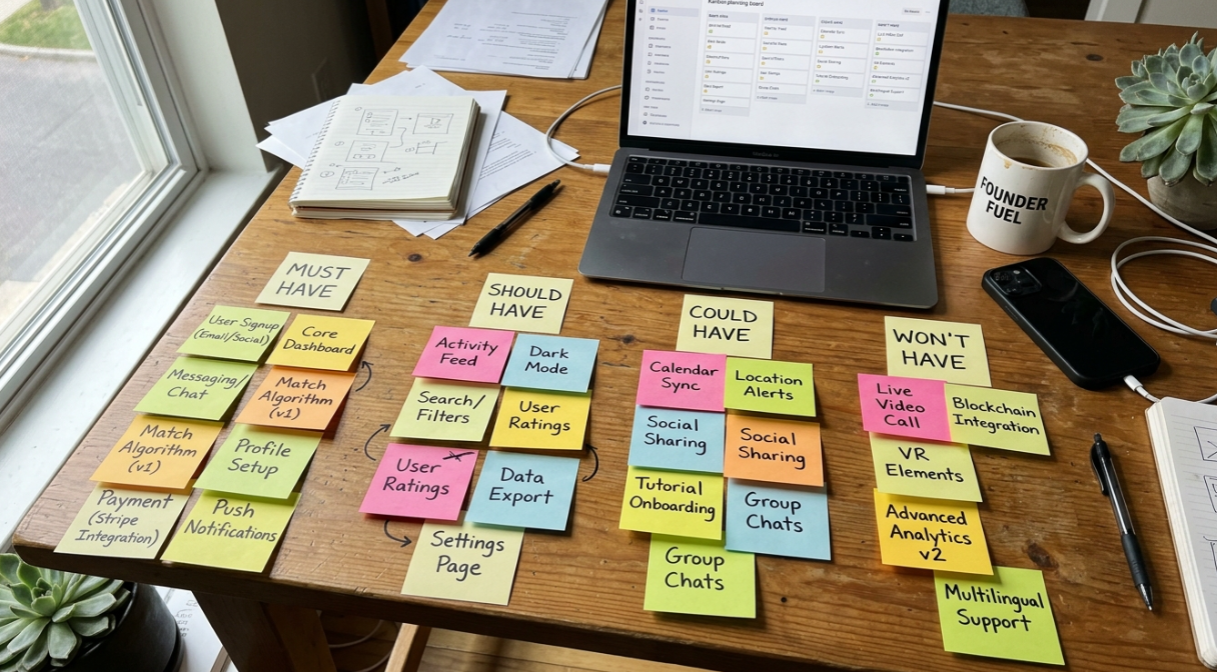
List every feature you’ve imagined, then sort them using the MoSCoW method:
Must Have: Essential for the app to function. Without these, the product doesn’t solve the stated problem.
Should Have: Important but not critical for launch. Can ship in version 1.1.
Could Have: Nice additions that enhance the experience. Low priority.
Won’t Have (for now): Explicitly out of scope. This list is sacred.
Only Mobitouch among the top-ranking pages for this keyword even mentions MoSCoW, yet it’s the single most practical feature prioritization framework for MVP scoping. Practitioners report that combining MoSCoW with riskiest-assumption testing scopes 90% of MVPs successfully.
A rule of thumb: if “I really want this feature” is your only justification for Must Have status, move it to Should Have. Every Must Have should trace back to a validated user need.
How to Decide Whether a Feature Belongs in the MVP
Question | If Yes | If No |
|---|---|---|
Does the feature directly solve the core problem? | Consider Must Have | Move down the list |
Can the app work without it? | Consider Should/Could Have | Consider Must Have |
Do users need it during the first session? | Higher priority | Lower priority |
Is there evidence users want it? | Higher confidence | Validate first |
Does it introduce major technical complexity? | Evaluate carefully | Easier to include |
Can it be added after launch? | Usually defer | Consider including now |
Rule: A feature should not become a Must Have simply because it sounds valuable. It should be necessary to deliver the app's core value proposition.
4. User Flow and Navigation
Describe the journey from first open to the core action. You don’t need wireframes at this stage (though they help). A simple numbered list works:
User opens app for the first time
Registration or onboarding screen
Main dashboard or home screen
Primary feature interaction
Return loop (notifications, saved state, streak)
The goal is to show the critical path. If someone opens your app and completes one meaningful action, what screens did they pass through?
For guidance on designing that first experience, the app onboarding guide covers best practices in detail.
5. Design Preferences
You don’t need to be a designer to fill this out. Include:
Two or three apps whose visual style you admire (and what specifically you like about them)
Color palette direction (dark mode, light and minimal, bold and colorful)
Any existing brand assets (logo, fonts, brand guidelines)
Competitor references are powerful here. If you love how Duolingo handles progress tracking or how Headspace uses illustration, say so. Concrete references communicate more than abstract adjectives like “clean” or “modern.”
The AI app templates guide provides starting points if you’re not sure where to begin with visual direction.
6. Platform and Technical Considerations
State your platform choice clearly: iOS only, Android only, or both. For a first launch, picking one platform reduces complexity and cost significantly.
Native development (Swift for iOS, Kotlin for Android) delivers the best performance and user experience but historically required specialized developers. Cross-platform frameworks like React Native or Flutter trade some native polish for simultaneous multi-platform output.
If you’re targeting iOS first, note that the App Store has specific requirements around metadata, screenshots, and review guidelines that should inform your brief.
7. Monetization Model
Specify how the app will make money. The common models:
Subscription (monthly/yearly recurring revenue)
Freemium (free core with paid upgrades)
One-time purchase
In-app purchases (consumable or non-consumable)
Advertising
This isn’t an afterthought. Your monetization strategy directly affects app architecture. For iOS apps, subscription models require StoreKit integration, receipt validation, and paywall design. If you wait until after the app is built to decide on monetization, you’re looking at significant rework.
A deeper breakdown of the options and compliance considerations lives in the app monetization models guide.
8. Budget and Timeline
Be honest about both. What is a project without a timeline? And who gives a timeline for a project without a budget?
If you don’t have a fixed budget, state a range. If you don’t have a hard deadline, state a target. “We’d like to launch an MVP within 3 months with a budget under $15,000” is infinitely more useful than “as soon as possible.”
For context on what apps actually cost to build, the app cost calculator guide breaks down real-world numbers.
9. Competitor References
Name two to five apps in your space. For each one, note:
What they do well
What they do poorly
Which specific features you’d want to borrow or improve on
This section isn’t about proving your idea is unique. It’s about giving your development partner (human or AI) a reference frame. If you can say “like Notion’s block editor but focused on recipe collections,” you’ve communicated more in one sentence than three paragraphs of feature descriptions would.
10. Success Metrics
How will you know the app is working? Define two or three measurable outcomes:
Daily active users (DAU) target at 30/60/90 days
Conversion rate from free to paid
Retention rate (Day 1, Day 7, Day 30)
Revenue target for the first quarter
Without success metrics, you have no way to evaluate whether the app achieved its purpose. This section also forces you to think about what you’ll track, which influences analytics implementation during the build.
App Idea Brief vs. PRD vs. MVP Scope
These three documents answer different questions. Confusing them can lead to either under-planning or unnecessary documentation.
Document | Main Question | Typical Content | When to Create |
|---|---|---|---|
App Idea Brief | What are we building and why? | Problem, audience, features, business model, constraints | Before development |
MVP Scope | What are we building first? | Must-have features, exclusions, launch requirements | During planning |
PRD | What exactly should the product do? | Requirements, user stories, acceptance criteria, edge cases | Before/during development |
Technical Specification | How will it be built? | Architecture, APIs, database, infrastructure, technical decisions | After product requirements |
The Relationship
The typical sequence is:
Idea → App Idea Brief → Validation → MVP Scope → PRD → Technical Plan → Development
For a small app, these documents can sometimes be combined. For a larger product, keeping them separate makes ownership and decision-making clearer.
What Should You Leave Out of an App Idea Brief?
An app idea brief should provide enough detail to create alignment without becoming a technical specification.
Avoid filling the initial brief with:
Detailed database schemas
API contracts
Complete acceptance criteria
Exhaustive edge cases
Production infrastructure configuration
Line-by-line technical implementation
Every possible feature you may add someday
Those details can be documented later in the PRD or technical specification.
The brief should be detailed enough to remove strategic ambiguity, but short enough that someone can understand the product concept quickly.
What to Validate Before Building an App
An app idea brief should document assumptions that have been tested, not just assumptions the founder believes to be true. You do not need a large research project. The goal is to test the assumptions that could make the entire idea fail.
Validate These Five Assumptions First
1. The problem exists
Talk to potential users and determine whether they experience the problem frequently enough to care about solving it.
2. The problem is painful enough
A problem can be real without being important. Ask what users currently do to solve it and what that workaround costs them in time, money, or frustration.
3. The target user is reachable
Define where your potential users can actually be found. An ideal customer who cannot be reached economically is not a practical initial market.
4. Your proposed solution is meaningfully better
Compare the proposed experience with existing alternatives. The goal is not necessarily to create something completely new. It is to create a sufficiently better solution for a specific user.
5. Users will take the desired action
Test the behavior that matters most. Depending on the app, that might be joining a waitlist, creating an account, requesting a demo, completing a prototype task, or paying.
A Simple Validation Loop
Assumption → Test → Evidence → Decision
If the evidence contradicts the assumption, update the brief before investing heavily in development.
The brief should therefore be treated as a living document rather than a permanent statement of what the product must become.
App Idea Brief Template
Use the following template to turn an app concept into a development-ready brief. Keep each section concise. You can expand the document later as you validate assumptions.
1. Problem and App Purpose
What problem does the app solve?
[Describe the specific user problem in 1 to 3 sentences.]
Why does this problem matter?
[Explain the pain, cost, frustration, or inefficiency.]
What is the proposed solution?
[Describe what the app does in simple language.]
2. Target Audience
Primary user:
[Describe one primary user persona.]
Age/location:
[Optional demographic information.]
Main goal:
[What does this user want to accomplish?]
Biggest frustration:
[What currently makes this difficult?]
Current alternative:
[What does the user do today instead?]
3. Core Features and Priorities
Feature | Priority | Why It Matters |
|---|---|---|
[Feature 1] | Must Have | [User need] |
[Feature 2] | Must Have | [User need] |
[Feature 3] | Should Have | [Reason] |
[Feature 4] | Could Have | [Reason] |
[Feature 5] | Won't Have Yet | [Why it is out of scope] |
4. User Flow
Primary user journey:
User opens the app
[Step]
[Step]
[Core action]
[Result]
[Return/retention loop]
5. Design Direction
Visual style:
[Minimal, playful, professional, bold, etc.]
Apps or products to reference:
[Example 1] — [What you like]
[Example 2] — [What you like]
[Example 3] — [What you like]
Brand requirements:
[Logo, colors, typography, existing brand guidelines, etc.]
6. Platform and Technical Considerations
Initial platform:
[iOS / Android / Web / Cross-platform]
Device requirements:
[Phone, tablet, desktop, etc.]
Required integrations:
[Payments, maps, authentication, APIs, notifications, etc.]
Technical constraints:
[Any known requirements or limitations.]
7. Monetization
Business model:
[Subscription / Freemium / One-time purchase / In-app purchase / Advertising / Other]
Free experience:
[What users get without paying.]
Paid experience:
[What users pay for.]
8. Budget and Timeline
Target MVP launch:
[Date or timeframe]
Budget range:
[$X–$Y]
Must-meet deadline:
[If applicable]
Budget constraints:
[Any important limitations.]
9. Competitor References
Competitor | What They Do Well | What Could Be Better | What We Can Learn |
|---|---|---|---|
[Competitor 1] | [Strength] | [Weakness] | [Insight] |
[Competitor 2] | [Strength] | [Weakness] | [Insight] |
[Competitor 3] | [Strength] | [Weakness] | [Insight] |
10. Success Metrics
Primary success metric:
[One metric that best represents product success.]
Secondary metrics:
[Metric 1]
[Metric 2]
[Metric 3]
30-day target:
[Target]
90-day target:
[Target]
Validation Before Building
What assumption needs to be tested first?
[Biggest risk.]
How will we test it?
[Interviews, survey, landing page, prototype, waitlist, etc.]
What result would change our decision?
[Define the validation threshold.]
Out of Scope
[List features, platforms, integrations, or markets that will not be included in the first version.]
Open Questions
[Question 1]
[Question 2]
[Question 3]
App Idea Brief Example
Here is what a completed brief might look like for a hypothetical app.
App Concept
App: Meal planning app for busy families
1. Problem
Parents with limited time struggle to decide what to cook each day and often waste money buying ingredients they do not use.
2. Target User
Busy parents who plan meals for a household of three to five people and want to reduce weekly planning time and food waste.
3. Core Features
Must Have
Weekly meal planner
Recipe library
Automatic shopping list
Should Have
Dietary filters
Family member preferences
Could Have
Nutrition tracking
Recipe sharing
Won't Have Yet
Grocery delivery integration
Social feed
4. Core User Flow
User creates a household profile → selects dietary preferences → chooses meals → generates weekly plan → automatically creates shopping list.
5. Design Direction
Simple, mobile-first interface with large food imagery, fast navigation, and minimal data entry.
6. Platform
iOS and Android.
7. Monetization
Freemium model with a free weekly planner and paid access to advanced meal planning features.
8. Budget and Timeline
Initial MVP target: 12 weeks.
Budget: [Insert validated budget range.]
9. Competitors
Review three existing meal-planning apps and identify gaps in their planning workflow, recipe discovery, and shopping-list experience.
10. Success Metrics
Primary metric: percentage of new users who create their first weekly meal plan.
Secondary metrics: weekly retention, meal plans created per user, and free-to-paid conversion.
Validation Question
Before development, test whether busy parents consider weekly meal planning a sufficiently painful problem to adopt a dedicated app.
Common Mistakes That Sink App Idea Briefs
Writing a Feature List Instead of a Brief
The most common failure mode. An app brief that’s really just a feature list, or worse, a solution looking for a problem, is the most expensive mistake in project documentation. Features without context (who needs them, why, and how they connect) give developers nothing to work with strategically.
Skipping Validation
A founder has an idea, feels confident there’s a market, and jumps directly into building. This pattern plays out constantly. The CB Insights data on startup failure isn’t theoretical; it reflects thousands of real companies that built before validating.
Your app idea brief template should document validated assumptions, not hopes. Even lightweight validation counts: five customer interviews, a landing page test, a competitor review that confirms demand exists.
Overloading the Must-Have Bucket
When everything is essential, you don’t have an MVP, you have a full product launch on a startup budget. Tie every Must Have to a validated user need. If a feature doesn’t directly serve the core problem statement, it belongs in Should Have at best.
Ignoring the Won’t-Have List
Writing down what’s explicitly out of scope, and treating that list as sacred, prevents scope creep. A visible “not building yet” list reassures stakeholders that their pet feature has been heard and recorded, not rejected forever. It also keeps your app launch checklist manageable.
Treating the Brief as a One-Shot Document
Some founders write the brief, email it, and never touch it again. The best briefs evolve. They get updated after user interviews, after technical discovery conversations, after the first prototype reveals something unexpected. A brief that doesn’t change probably isn’t being used.
This is especially relevant with AI tools. One-shot generation, where you dump a single prompt and expect a finished app, consistently produces brittle results. Understanding why one-shot app generation breaks helps explain why iterative planning matters.
App Idea Brief vs. Full Requirements Document
App Idea Brief | Requirements Document (SRS/PRD) | |
|---|---|---|
Length | 1 to 5 pages | 10 to 50+ pages |
Audience | Founders, stakeholders, dev partners, AI tools | Engineering teams |
Detail level | Strategic: what and why | Tactical: how, with edge cases |
When to use | Before any development begins | After discovery and planning phase |
Format | Narrative with bullet points | Structured spec with acceptance criteria |
The brief is the precursor. It shapes the requirements document, not the other way around. If you’re a non-technical founder, the brief is almost certainly the document you need. The requirements doc is what your technical partner creates from it.
How AI App Builders Are Changing the Brief

The traditional app idea brief template was designed for one purpose: to be emailed to a dev agency or handed to a freelancer. That’s still a valid use case. But it’s no longer the only one.
AI app builders now accept natural-language descriptions as their primary input. The quality of that description, essentially your brief, determines the quality of what gets generated. Stack Overflow’s 2025 Developer Survey found that 84% of developers use or plan to use AI tools, but positive sentiment actually dropped from over 70% to 60% in a single year. The takeaway: AI tools are powerful but not magic. The better your brief, the better the output.
Modern AI app studios increasingly have a “plan” or “intent” stage that functions as an interactive brief builder. Instead of filling out a static template and emailing it somewhere, you describe your idea and the tool structures it for you, mapping screens, features, data models, and user flows before any code is written.
x1’s Plan studio works exactly this way. You answer a set of questions about your app, and x1 maps out the screens, features, and architecture, effectively building the brief and the product plan simultaneously. It’s a workflow that replaces the static document with a living, interactive blueprint.
This matters because it closes the gap between “I have an idea” and “I have something I can build.” The app idea brief template doesn’t disappear in this workflow. It becomes the structured input that drives everything downstream.
If you’re evaluating tools and trying to figure out which approach fits, the app builder selection checklist is a practical starting point.
Quick-Start Checklist
If you want to write your app idea brief right now, here’s the minimum viable version. Grab a blank document and fill in these eight items:
One-sentence problem statement. What pain does your app solve, and for whom?
Primary user persona. One persona, not three. Name, age range, motivation, biggest frustration.
Three to five Must-Have features. The absolute minimum for a working product.
Two to three competitor apps. What you like and dislike about each.
Platform choice. iOS, Android, or both.
Monetization approach. Subscription, freemium, one-time purchase, ads, or “figure it out later” (just be honest).
Launch target. Even a rough date. “Q1 2026” is better than “eventually.”
Feed it in. Hand this to your dev partner or paste it into your AI builder.
That’s it. You can expand later, but these eight items give any builder (human or AI) enough to start a productive conversation.
Try x1 free with starter credits and see how your brief translates into a structured plan.
Frequently Asked Questions
How long should an app idea brief template be?
One to five pages. If it’s shorter than a page, you probably haven’t thought through key sections like target audience or monetization. If it’s longer than five pages, you’re drifting into requirements-document territory. The brief is a strategic document, not a technical specification.
Do I need to be technical to fill out an app idea brief?
No. The brief is designed for non-technical founders and business stakeholders. You should describe what you want the app to do and who it’s for. Technical decisions (frameworks, databases, API architecture) come later and are typically made by whoever builds the app.
What’s the difference between an app brief and a PRD?
A brief captures the strategic vision: problem, audience, key features, budget, and timeline. A PRD (Product Requirements Document) is a detailed technical specification that includes user stories, acceptance criteria, data schemas, API contracts, and edge-case handling. The brief comes first and informs the PRD.
Should I include wireframes in my app idea brief?
They’re helpful but not required. Simple sketches (even hand-drawn on paper) can communicate navigation flow more effectively than paragraphs of text. If you don’t have wireframes, describe the user flow as a numbered list of screens and actions.
How does MoSCoW prioritization work in a brief?
MoSCoW stands for Must Have, Should Have, Could Have, and Won’t Have. Assign every feature to one of these categories. Must Haves are the features without which the app can’t solve its core problem. Everything else gets ranked accordingly. The Won’t Have list is just as important as the Must Have list because it defines scope boundaries explicitly.
Can I use my app idea brief with an AI app builder?
Yes, and it’s increasingly the expected input format. AI app builders that have planning stages (like x1’s Plan studio) consume natural-language descriptions and structure them into screens, features, and architecture. A well-written brief produces significantly better AI output than a vague prompt.
How often should I update my app idea brief?
Update it after every significant discovery: user interviews that change your understanding of the audience, technical constraints that affect feasibility, or pivot decisions that shift the core value proposition. A brief that never changes is a brief that’s being ignored.
What’s the biggest mistake founders make with app briefs?
Building before validating. The brief should document evidence that the problem is real, not just your belief that it is. Five customer interviews or a simple landing page test can validate (or invalidate) assumptions that would otherwise cost months and thousands of dollars to disprove through development.
Explore x1 pricing plans to find the right fit for your project.