

TL;DR
An MVP scope template is a structured document that defines what your minimum viable product will and won’t include at launch. Its most valuable section is the out-of-scope list, which prevents the feature creep that kills most early-stage products. A good template covers seven sections: problem statement, target user, core user journey, must-have features (3 to 5), explicit out-of-scope items, success metrics, and constraints. When combined with AI-assisted build tools, a disciplined scope document can compress your timeline from months to weeks.
MVP Scope Template: Quick Answer
An MVP scope template defines exactly what a minimum viable product will include, exclude, and measure at launch. A practical MVP scope should contain seven sections: problem statement, target user, core user journey, must-have features, out-of-scope items, success metrics, and constraints. Keep the first release focused on 3 to 5 core features and explicitly document everything deferred to prevent scope creep.
Then immediately follow it with a small visual/table:
MVP Scope Section | What to Define |
|---|---|
Problem Statement | The specific problem being solved |
Target User | The first user who needs the solution |
Core User Journey | The shortest path to the product's value |
Must-Have Features | 3 to 5 features required for the core experience |
Out-of-Scope | Features intentionally deferred |
Success Metrics | Measurable criteria for validating the MVP |
Constraints | Budget, deadline, platform, technology, and compliance |
What Is an MVP Scope Template?
An MVP scope template is a structured document that draws a clear boundary around what gets built in your first release and, just as importantly, what gets deferred. It typically includes the problem you’re solving, who you’re solving it for, the features that deliver core value, the features you’re explicitly not building yet, how you’ll measure success, and your hard constraints on budget and timeline.
You might hear it called a product requirements document (PRD) or software requirements specification (SRS). At early-stage companies, these are essentially the same document with different names. The format matters less than the function: forcing a decision about what’s in and what’s out before a single line of code gets written.
The primary job of this document is not to describe everything the product will ever do. It’s to define what you are not building. That distinction is what separates a useful scope template from a wish list.
If you’re a non-technical founder about to brief a developer or agency, this is the document that protects your budget. If you’re an indie maker building with AI tools, it’s the guardrail that keeps you from generating features nobody asked for.
MVP Scope vs. PRD vs. SRS: What Is the Difference?
An MVP scope document, product requirements document (PRD), and software requirements specification (SRS) can overlap, but they serve different purposes.
Document | Primary Purpose | Typical Detail Level | Best Used For |
|---|---|---|---|
MVP Scope | Defines the boundaries of the first release | Low to medium | Founders and MVP teams |
PRD | Defines product requirements and user needs | Medium to high | Product managers and development teams |
SRS | Defines detailed software requirements | High | Engineering and technical teams |
An MVP scope focuses on what must be built now and what will wait. A PRD usually provides more detail about product behavior, requirements, and user needs. An SRS is generally more technical and may define system behavior, interfaces, functional requirements, and technical specifications.
For an early-stage product, you usually do not need a 50-page requirements document. You need a clear scope that everyone can understand and agree on.
How to Scope an MVP in 7 Steps

Creating an MVP scope is easier when you work from the problem backward rather than starting with a feature list.
Step 1: Define the problem
Write the specific problem your product needs to solve.
Step 2: Choose one primary user
Identify the first user who experiences that problem most frequently or intensely.
Step 3: Define the core outcome
Describe what the user should be able to accomplish with your MVP.
Step 4: Map the minimum user journey
List the fewest steps required to get from opening the product to achieving the desired outcome.
Step 5: Identify must-have features
List only the features required to make that journey possible.
Step 6: Move everything else out of scope
Put secondary features, integrations, polish, automation, and expansion ideas into a deferred list.
Step 7: Define validation criteria
Choose two or three measurable outcomes that will tell you whether the MVP assumption was correct.
The result should be a scope that is small enough to build quickly but complete enough to test the product's central hypothesis.
What Should Not Be Included in an MVP?
An MVP should not automatically include every feature that would make the finished product better. Features should be deferred when they do not help test the core product assumption.
Common candidates for the post-MVP roadmap include:
Advanced analytics
Complex customization
Multiple platform versions
Social features
Advanced automation
Extensive integrations
Complex permission systems
Loyalty programs
Advanced reporting
Non-essential animations and visual effects
Rarely used settings
Enterprise features
This does not mean these features are unnecessary forever. It means they should earn their place through user feedback, usage data, revenue potential, or another clear business justification.
Why You Need an MVP Scope Template Before Building
The numbers on product failure are stark, and almost none of the failures are technical.
CB Insights found that 42% of startups fail because there was no market need for what they built. Not because the code broke. Not because the servers went down. Because they built the wrong thing, or too much of it. Meanwhile, research from the Project Management Institute shows that roughly two-thirds of software features are rarely or never used. That’s a staggering amount of wasted effort baked into the average product.
McKinsey’s research paints a similar picture: only about 20% of startups successfully reach product-market fit and scale. The average failed startup burns through its capital in just 20 months, and 29% collapse specifically because they run out of cash. Every feature you build that nobody uses accelerates that clock.
Scope creep is the mechanism through which these failures happen. It’s almost never one dramatic decision. It shows up as sprint reviews where new features appear without anything being removed, a backlog that grows faster than it shrinks, and conversations that start with “while we’re in there, we could also…” Each addition feels small. The cumulative effect is a product that takes twice as long, costs twice as much, and tests none of its core assumptions.
A scope template is the antidote. It gives you a reference document so that when someone suggests adding a feature mid-build, you can point to the out-of-scope list and say “not this version.” To understand how scope directly affects your budget, the app cost calculator breaks down where money actually goes.
The deadline-first principle
A scope without a deadline is a wish list. Practitioners who’ve shipped repeatedly converge on the same advice: set the date first, then scope to fit it. If your budget is $30,000 and your timeline is 10 weeks, your MVP scope template must reflect that reality from day one. You don’t expand the timeline to fit the features. You cut features to fit the timeline.
A well-scoped MVP typically takes 8 to 16 weeks from concept to launch. Simple MVPs with 3 to 5 features can be built in 6 to 8 weeks, while more complex products requiring custom infrastructure may take 12 to 16 weeks. If your timeline exceeds 4 months, you’re almost certainly building too much.
Sections Every MVP Scope Template Should Have
An MVP requirements document does not need to be long. It needs to be clear. For a simple product, 1 to 2 pages works. For something more complex, 5 to 10 pages. Anything beyond 15 pages is a sign you’re overcomplicating the first release.
Here are the seven sections that belong in every MVP scope template.
Problem statement (one sentence)
Write a single sentence describing the specific problem your product solves. Not a mission statement. Not a vision. A problem.
Bad: “We’re building the future of personal finance.”
Good: “Freelancers lose 3 to 5 hours per month manually tracking expenses across bank accounts and receipt photos.”
If you can’t articulate the problem in one sentence, you don’t understand it well enough to scope a solution.
Target user (one specific person)
Describe one real person, not a demographic segment. Give them a name, a role, and a context. “Sarah, a freelance graphic designer with 8 clients, using a spreadsheet to track invoices” is useful. “Millennials interested in finance” is not.
The more specific your target user, the easier it becomes to evaluate every feature against the question: would Sarah actually need this in week one?
Core user journey (sign-up to value)
Map the shortest path from a new user opening your app to experiencing its core value. This is typically 3 to 5 screens. For a ride-sharing app, it’s: open app, enter destination, request ride, get matched, arrive. Every screen and interaction on this path is a candidate for must-have status. Everything else probably isn’t.
Must-have features (3 to 5 maximum)
This is where discipline matters most. A well-scoped MVP typically includes 3 to 5 core features that solve the primary problem. That usually means user registration, one main workflow, a basic user profile, and essential notifications. That’s it.
For every feature on your list, apply the one-question test: “If we launch without this, can users still solve their core problem?” If the answer is yes, the feature is not a must-have for your MVP. For a deeper breakdown of how to run this evaluation, the feature prioritization template walks through multiple frameworks side by side.
Out-of-scope list (the most important section)
This is the section that most templates treat as an afterthought and that most successful builders treat as the centerpiece. The out-of-scope list is your primary defense against scope creep.
Be specific. “Advanced features” as an out-of-scope item is useless. “Team collaboration, calendar sync, and time tracking” is clear. When someone suggests adding one of these during development, you point to this list. The conversation ends quickly instead of spiraling into a debate about priorities.
One practitioner on dev.to put it bluntly: “if you’re building before validating demand, you’re guessing. And guessing adds 3 to 6 months of wasted time minimum.” The out-of-scope list is how you formalize the commitment to not guess.
A strong out-of-scope section for a task management MVP might look like this:
Recurring tasks and automation rules
Team/shared workspaces
Calendar integration
File attachments
Analytics dashboard
Dark mode
Android version
Each item is specific enough that there’s no ambiguity about whether it’s in or out.
Success metrics (what counts as yes or no)
Define what “working” means before you build. This should be 2 to 3 measurable outcomes that tell you whether the MVP validated your assumption or didn’t. Examples: “50 users complete the core workflow in the first 2 weeks” or “30% of beta users return within 7 days.”
Without predefined success metrics, you’ll rationalize any outcome as positive. That defeats the purpose of building an MVP in the first place.
Constraints: budget, timeline, and tech stack
State your hard limits. Budget range, launch deadline, platform (iOS, Android, web), and any technical requirements like specific APIs or compliance standards.
For iOS builders specifically, this section should also include items that other scope templates miss entirely: App Store Review compliance requirements, provisioning profiles and certificates, paywall and subscription compliance (Apple requires specific UI flows), and screenshot assets for your App Store listing. These aren’t optional extras. Apple will reject your app without them. The App Store QA checklist covers these requirements in detail.
Feature Prioritization Frameworks for Scoping
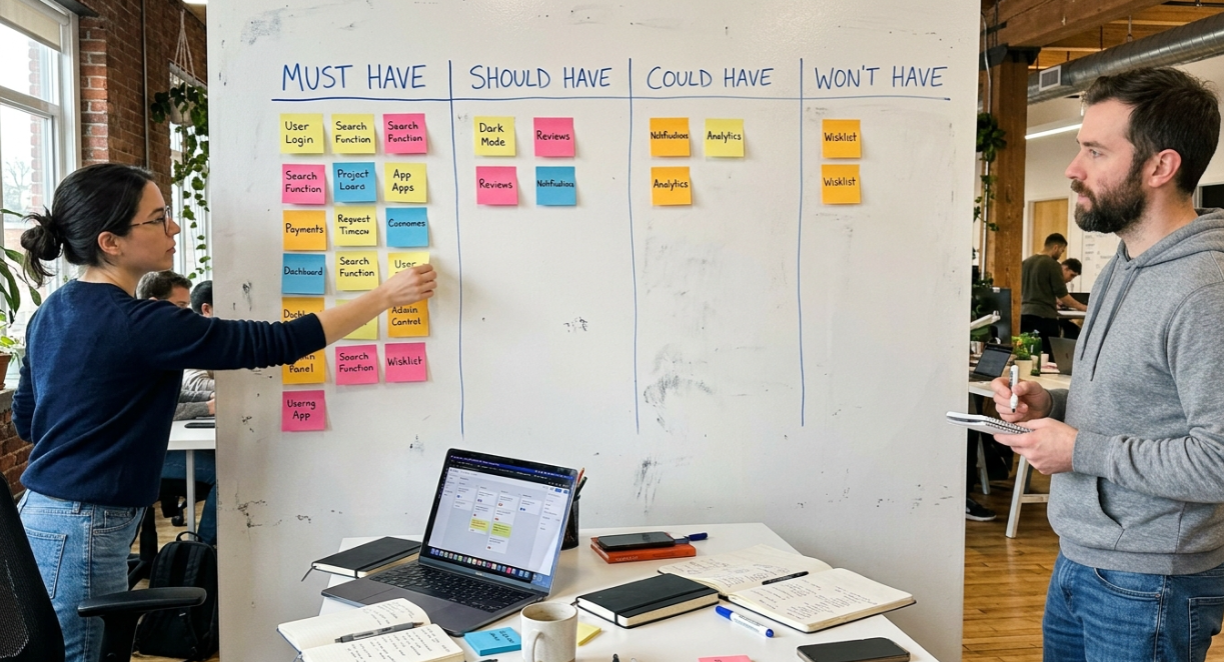
Once you’ve listed every possible feature, you need a systematic way to sort them into must-have, deferred, and cut. Two frameworks dominate this space.
MoSCoW method
MoSCoW is the most accessible prioritization framework for non-technical builders, and it’s the one most ranking guides lead with for good reason. The acronym stands for:
Must have: Features absolutely essential for the MVP to work. Without them, the product has no value. These are your 3 to 5 core features.
Should have: Valuable features that improve the experience but aren’t mission-critical for launch.
Could have: Nice-to-haves that can wait for v2 or v3.
Won’t have: Explicitly deferred. Not “maybe later” but “definitely not this version.”
A concrete example for a ride-sharing MVP: “Request a ride” is a Must-have. “Rate your driver” is a Should-have. “Choose music in the car” is a Could-have. “Schedule rides a week in advance” is a Won’t-have.
The most common MoSCoW pitfall is letting founder preference override user need. “I really want this feature” is not a valid reason for Must-have status. Every Must-have should be tied to a validated user need. If you haven’t validated that users need it, it’s probably a Should-have at best.
RICE scoring
For founders who want a more quantitative approach, the RICE scoring model (developed by Intercom’s product team) evaluates features across four dimensions:
Reach: How many users will this affect per quarter?
Impact: How strongly does it influence the key metric? (Scored 0.25 to 3)
Confidence: How sure are you about these estimates? (Expressed as a percentage)
Effort: How many person-weeks to build?
The formula: (Reach × Impact × Confidence) / Effort = RICE score. Higher scores get built first. This works well when you have 15+ candidate features and need a data-driven way to compare them.
The one-question shortcut
Regardless of which framework you use, one question cuts through analysis paralysis faster than anything else: “Can the product test its core assumption without this feature?” If yes, the feature waits. This single filter, applied ruthlessly, will cut your feature list in half.
MVP Scope Mistakes That Burn Time and Money
Building too much
The most common MVP mistake isn’t building too little. It’s building too much. If your MVP takes six months to ship, it’s no longer minimal. You’ve likely added features that feel essential but aren’t validated. A practitioner perspective shared on community forums captures it well: set a fixed timebox and scope the build to fit it, rather than expanding the timeline to fit the scope.
No out-of-scope list
Without an explicit list of what you’re not building, every stakeholder conversation becomes a negotiation. The scope expands by a feature here, an integration there. The timeline quietly doubles. A scope template without an out-of-scope section is incomplete.
Gold-plating before validating
Spending three weeks perfecting a button animation while the core logic is still buggy is a form of procrastination disguised as quality. Your MVP exists to test whether anyone wants what you’re building. Polish comes after validation, not before.
Letting the HiPPO decide
HiPPO stands for “Highest Paid Person’s Opinion.” When feature decisions are driven by whoever has the most authority in the room rather than actual user data, the scope inflates with pet features. The MVP scope template exists specifically to counter this by tying every must-have to a validated user need.
Opaque requirements
Vague terms like “make it fast” or “clean design” create misalignment between founders and builders. Replace them with specifics: “page load under 2 seconds” and “white background, single-column layout, system fonts.” Your scope document should contain zero ambiguous adjectives. This matters especially if you’re using AI-assisted tools, because one-shot generation breaks when requirements are vague.
Ignoring the scope trade rule
Any change to scope should require removing something of equal size. This is called a scope trade. Adding a feature without cutting one is how timelines silently expand. Build this rule into your process from day one.
MVP Scoping in the Age of AI App Builders
The scoping conversation has changed fundamentally in the last two years. AI coding assistants and agentic engineering platforms now handle boilerplate, authentication, and common integrations automatically. A senior developer writes roughly 200 to 300 lines of production code per day. AI tools can generate that in minutes.
The result: with AI-assisted development, a well-scoped MVP can ship in days to three weeks instead of the traditional 3 to 6 months. The bottleneck shifts from code generation to code review and judgment.
This speed creates a paradox. When code is cheap and fast, the temptation to add features grows. “We can just add that, it only takes a few minutes” becomes the new version of scope creep. A strong MVP scope template becomes more critical, not less, because there’s no longer a natural cost barrier to feature bloat.
Guided workflows are replacing the blank-page problem that made scoping hard in the first place. Instead of staring at an empty document wondering what to include, AI app studios walk you through structured questions: what does your app do, who is it for, what screens do you need, what happens when a user taps this button.
x1, for example, breaks its workflow into five stages (Plan, Design, Build, Launch, Iterate). The Plan stage is essentially an automated MVP scope template. You describe your idea in plain English, then map screens, features, and flows through a guided process. The result is a structured scope that feeds directly into design and development, with no handoff gaps or lost context.
See how the full workflow works
For iOS builders specifically, this matters because Apple’s App Store Review introduces scoping requirements that web apps don’t face: paywall compliance, provisioning profiles, screenshot assets, and metadata formatting. A scope template that ignores these iOS-specific items sets you up for rejection. The App Store submission process covers what’s required.
MVP Scope Template: Quick-Reference Checklist
Use this as a starting point. Copy it, fill in each field, and resist the urge to expand it.
1. Problem Statement
One sentence. What specific problem does this product solve?
2. Target User
Name, role, context. One real person, not a segment.
3. Core User Journey
The shortest path from sign-up to core value. List each screen or step:
Step 1: ___
Step 2: ___
Step 3: ___
Step 4: ___
Step 5: ___
4. Must-Have Features (3 to 5)
Each tied to a validated user need:
Feature 1: ___
Feature 2: ___
Feature 3: ___
Feature 4 (if needed): ___
Feature 5 (if needed): ___
5. Out-of-Scope List
Be specific. Name each deferred feature:
6. Success Metrics
2 to 3 measurable outcomes that determine whether the MVP validated your hypothesis:
Metric 1: ___
Metric 2: ___
Metric 3: ___
7. Constraints
Budget: $___
Deadline: ___
Platform: iOS / Android / Web
Tech stack requirements: ___
iOS-specific: App Review compliance, provisioning, paywall/subscription UI, screenshot assets
8. Scope Trade Rule
Any new feature added after this document is signed requires removing a feature of equal effort. No exceptions.
This checklist works whether you’re briefing an agency, handing off to a co-founder, or feeding requirements into an AI build tool. The format is less important than the completeness: every section filled, every out-of-scope item named.
Ready to turn your scope into a real app? Try x1 with free credits and use the Plan studio to map your MVP scope in minutes.
MVP Scope Template
Use the following template to define your MVP before development begins.
1. Problem Statement
What problem are we solving?
[Describe the specific problem in one sentence.]
Why does this problem matter?
[Explain the user impact or business consequence.]
2. Target User
Primary user:
[Name, role, situation, or type of user]
Current solution:
[How does this user solve the problem today?]
Primary pain point:
[What makes the current solution inadequate?]
3. Core User Journey
Starting point:
[What does the user do first?]
Step 1:
[Action]
Step 2:
[Action]
Step 3:
[Action]
Step 4:
[Action]
Desired outcome:
[What value does the user receive?]
4. Must-Have Features
Feature | User Need Addressed | MVP Priority | Acceptance Criteria |
|---|---|---|---|
Feature 1 | [Need] | Must-have | [What must work?] |
Feature 2 | [Need] | Must-have | [What must work?] |
Feature 3 | [Need] | Must-have | [What must work?] |
Feature 4 | [Need] | Must-have | [What must work?] |
Feature 5 | [Need] | Must-have | [What must work?] |
5. Out-of-Scope Features
The following features will not be included in the first release:
[Feature]
[Feature]
[Feature]
[Feature]
[Feature]
Reason for deferral:
[Why are these features being postponed?]
6. Success Metrics
Metric | MVP Target | Measurement Method |
|---|---|---|
[Metric 1] | [Target] | [How measured] |
[Metric 2] | [Target] | [How measured] |
[Metric 3] | [Target] | [How measured] |
7. Constraints
Budget: [Amount/range]
Launch deadline: [Date]
Platform: [iOS / Android / Web]
Development approach: [Custom / No-code / AI-assisted / Hybrid]
Required integrations: [List]
Compliance requirements: [List]
Technical constraints: [List]
Scope Trade Rule
Any new feature added after the MVP scope is approved must replace or remove a feature of comparable effort. If nothing is removed, the feature is deferred to a later release.
MVP Scope Example: Task Management App
Imagine you are building a simple task management app for freelancers.
Problem Statement
Freelancers lose time managing client tasks across spreadsheets, email, and messaging apps.
Target User
Sarah is a freelance designer managing 8 active clients and currently tracks tasks in a spreadsheet.
Core User Journey
Sarah creates an account.
Sarah creates a project.
Sarah adds tasks to the project.
Sarah marks tasks as complete.
Sarah sees which tasks remain outstanding.
Must-Have Features
Feature | Why It Is Included |
|---|---|
Account creation | Allows users to create and access their workspace |
Project creation | Provides the basic organizational structure |
Task creation | Solves the core task-management problem |
Task completion | Allows users to track progress |
Basic task list | Gives users visibility into outstanding work |
Out of Scope
Team workspaces
Recurring tasks
Calendar synchronization
File attachments
Advanced analytics
Time tracking
Dark mode
Native Android app
Success Metrics
The MVP could be considered validated if:
50 users complete the core task workflow.
At least 30% of beta users return within seven days.
At least 20 users create more than one project.
Constraints
Budget: $10,000
Timeline: 8 weeks
Platform: Web
Integrations: Email authentication and basic analytics
This example demonstrates the central principle of MVP scoping: build the smallest product that can test the core assumption, not the smallest version of the final product.
Frequently Asked Questions
How long should an MVP scope template be?
For a simple product with 3 to 5 features, 1 to 2 pages is enough. More complex products with custom infrastructure might need 5 to 10 pages. If your scope document exceeds 15 pages, you’re likely trying to build too much for a first release.
What’s the difference between an MVP scope template and a PRD?
Functionally, they’re the same document. Different companies use different names. A PRD (product requirements document) and SRS (software requirements specification) serve the same purpose as an MVP scope template: defining what gets built, what doesn’t, and how success is measured. The MVP framing just emphasizes minimalism.
How many features should an MVP include?
Three to five core features that solve the primary user problem. An MVP typically includes user registration, one main workflow, a basic profile, and essential notifications. If you’re past five core features, apply the one-question test to each: can users still solve their core problem without it?
What’s the most important section of an MVP scope document?
The out-of-scope list. It prevents scope creep more effectively than any other section. When someone mid-build suggests adding a feature, you point to the out-of-scope list. The conversation resolves in seconds instead of spiraling into a meeting.
How much does a typical MVP cost to build?
Costs range widely. No-code MVPs can cost $5,000 to $15,000. Custom-built MVPs with experienced developers typically run $50,000 to $100,000. For iOS specifically, a basic functional MVP costs $20,000 to $60,000, while an investor-ready MVP can reach $60,000 to $120,000 or more. AI-assisted tools are compressing these ranges significantly.
How does AI change MVP scoping?
AI makes building faster but doesn’t eliminate the need for scope. In fact, it makes disciplined scoping more important because the cost barrier to adding features drops. When generating code takes minutes instead of days, “let’s just add one more thing” becomes the new form of scope creep. A clear scope template acts as the guardrail.
Should I scope for iOS and Android at the same time?
No. Pick one platform for your MVP. iOS and Android have different review processes, design conventions, and technical requirements. Scoping for both doubles your constraints and timeline. Most founders choose iOS first because App Store users spend roughly double what Google Play users spend, making it easier to validate willingness to pay.
When should I update my MVP scope template?
Only after you’ve shipped the MVP and analyzed your success metrics. The whole point of fixing scope before building is to resist changes during development. Post-launch, your user data tells you which assumptions were right and which were wrong. That’s when you revise the scope for v2.