

TL;DR
x1 is an AI app studio that generates native Swift/Xcode iPhone apps through a structured five-stage workflow, built specifically for shipping to the App Store. Replit is a browser-based AI coding platform that supports web, Android, and iOS development through React Native and Expo, making it a general-purpose tool with mobile capabilities added on top. If your goal is a polished, native iOS app, x1 is purpose-built for that. If you want a cross-platform prototype or a web app with mobile support, Replit covers more ground.
What is the difference between x1 and Replit?
x1 is a native iOS app builder that generates Swift and SwiftUI projects compiled through Xcode, designed specifically for App Store submission. Replit is a browser-based AI coding platform that builds cross-platform apps using React Native and Expo, allowing deployment to iOS, Android, and web from a single codebase. In short, x1 is optimized for shipping high-quality native iOS apps, while Replit is optimized for fast, general-purpose cross-platform prototyping and web-first development.
Quick-Reference Comparison Table
Category | x1 | Replit |
|---|---|---|
Primary focus | Native iOS apps | Web apps, cross-platform mobile |
Tech stack output | Swift / SwiftUI / Xcode project | React Native + Expo |
App Store workflow | Built-in (screenshots, ASO, submission) | External tools required |
Pricing model | Flat monthly subscription | Credit-based with variable charges |
Starting price | $99/mo (Builder) | Free tier; Core at $20/mo |
Platform scope | iOS only | Web + iOS + Android |
Code ownership | Full Xcode project export | Cloud-hosted, exportable |
Best for | iOS-focused founders shipping to App Store | Web-first builders exploring mobile |
See x1’s workflow in action to understand how each studio stage works before diving into the detailed comparison below.
Decision Matrix: x1 vs Replit (Which Should You Choose?)
Use Case | Best Choice | Why |
|---|---|---|
Shipping a native iOS App Store product | x1 | Native Swift + App Store workflow built-in |
Building a cross-platform MVP | Replit | React Native + Expo supports iOS + Android |
Non-technical founder launching iOS startup | x1 | Guided 5-stage studio workflow |
Web-first SaaS or dashboard | Replit | Strong web + backend ecosystem |
Fast prototyping / experimentation | Replit | Instant AI agent generation |
Long-term scalable iOS app | x1 | Native architecture reduces technical debt |
Glossary Section 1: Platform Architecture
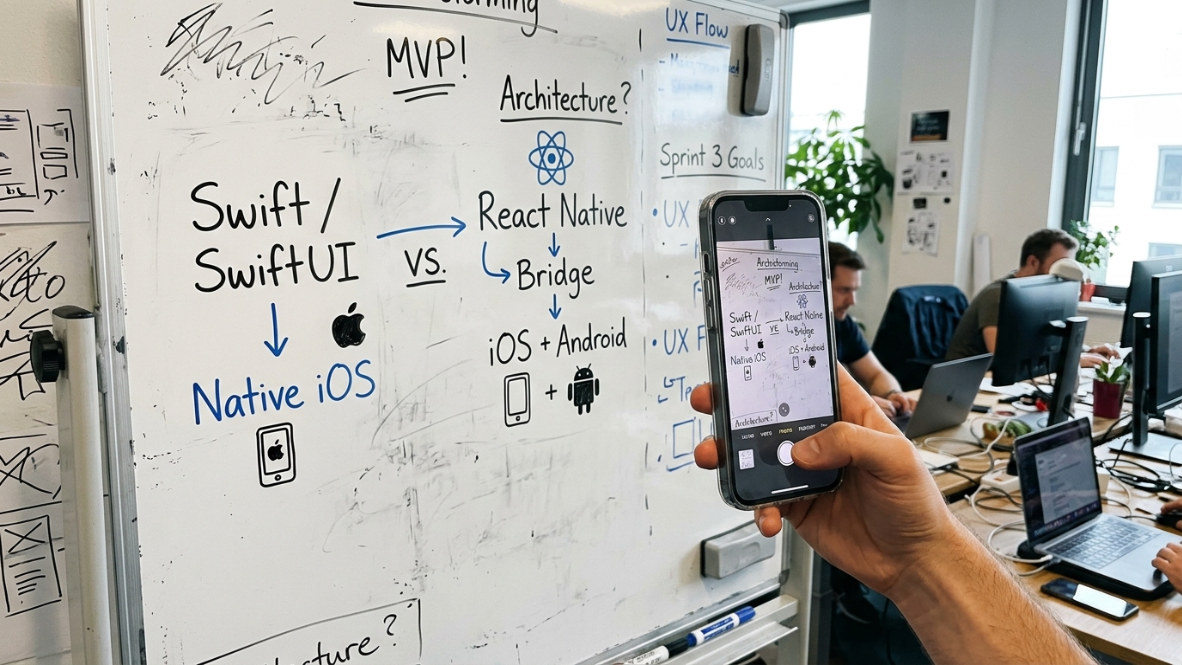
Understanding the architecture behind each tool is the single most important factor in this comparison. The technical choices made at the platform level ripple through everything: performance, App Store approval odds, long-term maintainability, and what your app can actually do on an iPhone.
Native App
A native app is built using the programming language and frameworks designed specifically for a given operating system. On iOS, that means Swift and SwiftUI compiled directly into machine code that runs on the iPhone without any translation layer.
x1 generates native apps. The output is a real Xcode project written in Swift, the same language Apple uses to build its own apps. This matters because native apps get full access to iOS features like home screen widgets, Live Activities, augmented reality frameworks, and device sensors.
Cross-Platform App
A cross-platform app uses a single codebase to target multiple operating systems (iOS, Android, web). The tradeoff is convenience for depth. You write once and deploy broadly, but you sacrifice some performance and platform-specific capability.
Replit builds mobile apps using this approach. Its mobile apps feature transforms text prompts into deployable iOS apps through React Native and Expo, a cross-platform pipeline that runs invisibly under the hood.
React Native and Expo
React Native is Meta’s open-source framework for building mobile apps with JavaScript. Expo is a toolkit layered on top of React Native that simplifies the build and deployment process.
Replit uses this stack for all its mobile app generation. The advantage: one codebase can produce both iOS and Android apps. The disadvantage: React Native sits on top of an abstraction layer (sometimes called a “bridge”) that translates JavaScript into native views. This extra step can impact performance, especially in animation-heavy or computation-intensive apps.
Practitioners report real friction with this approach. Users on Apple developer forums have documented apps that work perfectly in development but show only a white screen in production builds installed via TestFlight. Others report that in-app purchases using react-native-iap encounter errors that prevent subscription functionality entirely.
Swift and SwiftUI
Swift is Apple’s programming language for iOS development. SwiftUI is its declarative UI framework. Together, they represent the standard way Apple intends apps to be built.
Swift compiles directly into native code, resulting in faster performance compared to React Native’s JavaScript-to-native translation process. The difference shows up in app speed, animation smoothness, and responsiveness, particularly in complex applications.
For a deeper look at how these technologies translate into real app output, see examples of native iOS apps built with x1’s Swift/Xcode pipeline.
Bridge Layer (Abstraction Layer)
The bridge is the software layer in React Native that connects JavaScript code to native iOS components. Every interaction between your app’s logic and the iPhone’s operating system passes through this bridge.
Native Swift apps skip it entirely. That is the core architectural difference between x1 and Replit’s mobile output, and it affects everything from scroll performance to how deeply the app can integrate with iOS features.
Xcode Project
Xcode is Apple’s official development environment. An Xcode project is the standard package of files, configurations, and code that Apple’s tools recognize and compile into an iPhone app.
x1 outputs a complete Xcode project. This is significant because it means you own a standard, portable artifact. You can open it in Xcode, modify it, hand it to a developer, or continue iterating on it independently. This distinction is central to understanding different AI app builder types and their tradeoffs.
Glossary Section 2: Workflow and Building Approach
How you interact with an AI builder determines how much control you have, how predictable the output is, and how painful iteration becomes. This is where the x1 vs Replit comparison gets most practical.
Vibe Coding
Vibe coding means describing what you want in natural language and letting AI generate the code. You focus on intent (“I want a fitness tracking app with a social feed”) rather than implementation details.
Both x1 and Replit support vibe coding, but they structure it differently. Replit drops you into a general-purpose prompt window. x1 channels natural language input through purpose-built stages, each focused on a specific part of the app development process.
Agentic Coding
Agentic coding goes a step further: the AI autonomously plans, writes, debugs, and deploys code. Replit’s Agent is one of the more complete agentic coding experiences available, combining AI generation with deployment workflow features.
The strength of agentic coding is speed to a working prototype. The weakness is coherence. When an autonomous agent makes hundreds of decisions without structured checkpoints, the resulting codebase can become fragile and hard to modify.
One-Shot Generation
One-shot generation means a single prompt produces a complete (or near-complete) app. It is fast and impressive for demos. It is also brittle.
The pattern practitioners describe on Reddit and Capterra reviews is consistent: the first prompt gets you 70-80% of the way there, and you feel amazed. But that remaining 20% takes forever. The next ten prompts yield incremental improvements while burning credits and time on the same feature. One Capterra reviewer noted that “fixing one error would cause five more to appear.” A CEO using Replit reported finding the AI “unreliable for multi-file refactors and dependency changes, where it tends to modify unintended files, break builds, and loop through expensive fix attempts.”
Studio-Based Workflow
x1’s approach splits the process into five focused stages, each called a “studio”:
Plan — Answer questions and x1 maps screens, features, and flow
Design — Shape brand, screens, and details on a visual canvas before building
Build — Generate the iPhone app screen by screen
Launch — Create App Store screenshots, listing copy, and submit
Iterate — Refine and polish after the initial build
The idea is disciplined sequencing rather than one giant prompt. Each stage constrains the next, so decisions about authentication, data models, and subscriptions are locked in before code generation begins. This reduces the architectural drift that plagues one-shot approaches.
For a complete walkthrough, x1’s idea-to-App-Store process breaks down each studio in detail.
Prompt Loop
The prompt loop is the iterative cycle of prompting, reviewing output, finding problems, and re-prompting. It is the defining frustration of general-purpose AI builders when applied to complex projects.
Multiple Capterra reviewers independently describe this pattern with Replit: the base AI model “can be frustratingly stupid at times, breaking code that already works when something else changes.” One user described building mobile apps on Replit as “a little difficult, mostly repeating the same request.” The prompt loop is not a bug in Replit’s design; it is an inherent limitation of unstructured AI generation applied to stateful, multi-screen applications.
Glossary Section 3: App Store Submission and Launch
Getting an app built is only half the job. Getting it approved and listed on the App Store is where many AI-built apps fail. This section of the x1 vs Replit comparison matters enormously for anyone planning to actually ship.
App Store Review
Apple reviews every app submitted to the App Store. The process checks for guideline compliance, performance standards, privacy requirements, and design quality. Roughly 31% of app submissions were rejected in 2025.
This rejection rate has real implications for AI-generated apps. Apple’s review teams are increasingly alert to patterns associated with template-based or mass-produced submissions.
Guideline 4.3 (Design Spam)
Apple’s Guideline 4.3 targets apps that share “a similar binary, metadata, and/or concept” as other apps. Submitting “similar or repackaged apps” is considered spam and grounds for rejection.
This is particularly relevant to the x1 vs Replit discussion. Apps built from template-like frameworks (React Native + Expo + AI generation) face heightened Design Spam risk because the underlying code patterns, project structure, and even default UI components can look similar across submissions. Native Swift apps with unique architecture present a fundamentally different profile to Apple’s reviewers.
Apple has already blocked updates to vibe-coded apps on the iOS App Store. Replit itself has been prevented from pushing updates to its iOS app. An app called Vibe Code was rejected entirely.
ASO (App Store Optimization)
ASO covers everything that affects your app’s discoverability in the App Store: title, subtitle, keywords, description, screenshots, and preview videos. Good ASO is the difference between an app that gets found and one that sits at zero downloads.
x1 includes ASO tools in its Launch studio, generating App Store screenshots and listing copy as part of the workflow. Replit does not include launch asset generation, so users need external tools for this step.
TestFlight
TestFlight is Apple’s official beta testing platform. Before submitting to the App Store, developers distribute builds through TestFlight to test on real devices.
Replit users have reported specific issues at this stage. React Native Expo apps can crash immediately on TestFlight installs despite working fine in the Expo Go development environment. This gap between development preview and production build is a known pain point in the React Native ecosystem.
Provisioning Profiles and Code Signing
These are the certificates and configurations Apple requires to run an app on a physical iPhone and submit it to the App Store. Managing them is notoriously painful, even for experienced developers.
Both tools handle this differently. x1’s workflow produces an Xcode project that integrates with Apple’s standard signing process. Replit’s Expo-based pipeline abstracts some of this away but can create confusion when builds fail for signing-related reasons.
Compare x1 plans to see which tier fits your launch timeline.
Glossary Section 4: Pricing and Cost Models
Pricing is where the x1 vs Replit comparison often surprises people. The sticker prices look straightforward, but the underlying models work very differently.
Credit-Based Pricing (Replit)
Replit uses an effort-based pricing model. Monthly plans include a set number of credits, and those credits get consumed by AI operations, deployments, and compute. Replit offers a free Starter tier, Core at $20/month ($25 monthly credits), and Pro at $95/month ($100 credits).
The problem practitioners consistently report is unpredictability. Replit employs 12 distinct charge categories beyond the monthly fee. Previous users have reported monthly bills ranging from $100 to $300 for a plan they expected to cost $25/month. One user noted that “the new pricing model has made my company look elsewhere due to the unpredictable nature of how much things will cost.”
Flat Subscription (x1)
x1 uses straightforward monthly pricing:
Builder: $99/mo ($66/mo billed yearly)
Pro: $199/mo ($133/mo billed yearly)
Max: $299/mo ($200/mo billed yearly)
The tiers differ in build capacity, iteration speed, and priority access. There are no credit overages or per-operation charges. x1 also offers around 100 free credits to try the product.
For a detailed breakdown of what each tier includes, compare x1’s pricing tiers.
Overage Charges
Overages happen when you exceed your plan’s included credits. On Replit, this is common during heavy iteration, which is exactly when you need the AI most (fixing bugs, refactoring, debugging production issues). Documented user experiences show power users paying 3-4x their subscription in overages.
x1’s flat model eliminates this variable. You know what the month costs before it starts.
Build Capacity
Build capacity refers to how many apps or iterations you can run within a billing cycle. On x1, higher tiers unlock more capacity and faster build speeds. The Builder tier covers everything needed for a first app. Pro and Max are designed for active builders iterating toward launch or managing multiple projects.
Glossary Section 5: Code Ownership and Maintainability
The code an AI builder produces is only valuable if you can maintain it, modify it, and own it long-term. This is where many builders fall apart after the initial excitement fades.
Code Ownership
Code ownership means you can take your output and run it independently of the platform that generated it. x1 produces an Xcode project in Swift that you fully own. You can open it in Xcode, hire a developer to extend it, or continue building without x1.
Replit’s code lives in its cloud IDE by default. You can export it, but the React Native + Expo codebase may carry dependencies on Replit-specific configurations. The practical question is: if you stop paying for the tool tomorrow, how easily can you continue developing?
Coherent Architecture
Coherent architecture means the codebase follows consistent patterns across every screen, every data model, and every user flow. It is the opposite of what typically happens when an AI agent makes hundreds of independent decisions without architectural constraints.
x1 emphasizes this through its sequential studio workflow. Because planning, data modeling, and design happen before code generation, the resulting Swift codebase follows a unified structure. This matters enormously for maintainability over time, especially when you need to add features or fix issues months after launch.
Technical Debt
Technical debt is the accumulated cost of shortcuts in code. AI-generated code is particularly prone to it because the AI optimizes for “working now” rather than “working well over time.”
Multiple sources note that code generated by AI in Replit still requires ongoing maintenance, and as applications scale to thousands of users, even small modifications risk breaking production systems. One Capterra reviewer stated that Replit “does not produce apps that are even remotely scalable” beyond basic ones.
Vendor Lock-In
Vendor lock-in is your dependency on a specific platform. Both tools carry some degree of lock-in, but the risk profiles differ.
With x1, you get a standard Xcode project. Swift and SwiftUI are Apple’s own technologies, maintained by Apple, used by millions of developers. Your code is portable by definition.
With Replit, you get a React Native + Expo project hosted in Replit’s cloud. React Native is open-source, so the code itself is portable. But the build pipeline, deployment infrastructure, and AI agent are all Replit-specific. Moving to a different development environment requires re-establishing your entire toolchain.
The Apple Crackdown: Why It Matters for This Comparison
This context is missing from most AI builder comparisons and it is critical.
With the rise of AI-built and vibe-coded apps, Apple is dealing with a flood of low-quality submissions. The response has been stricter review enforcement, particularly around Guideline 4.3 (Design Spam) and Guideline 4.2.6.
Consumer spending on iOS apps reached $117.6 billion in 2025. Over 55% of internet traffic comes from mobile devices, and 90% of mobile time is spent in apps, not browsers. Apple has every incentive to protect App Store quality because it protects App Store revenue.
For the x1 vs Replit comparison, this means the output format matters. Apps generated from cross-platform templates with shared code patterns are more likely to trigger Apple’s spam detection. Native Swift apps with unique project structures, custom SwiftUI views, and platform-specific implementations present a different signal to reviewers entirely.
The one-person app company model is accelerating. Competitors like Rork Max, which also generates native Swift apps, hit $1.5M ARR in just three days after launching. The market clearly wants native iOS tools. Apple clearly wants native iOS apps. These incentives are aligned.
For more on how this trend is shaping the tools market, read about the era of the one-person unicorn.
When to Choose Replit
Replit is the better choice when:
You need both iOS and Android. Replit’s React Native + Expo pipeline produces cross-platform output from a single codebase.
Your primary product is a web app. Replit’s core strength is web development. The cloud IDE, database tools, and deployment pipeline are all optimized for web-first projects.
You are prototyping, not shipping. For quick concept validation where App Store approval is not the immediate goal, Replit’s speed is hard to beat.
Budget is extremely tight. Replit’s free tier and $20/month Core plan have no equivalent in x1’s pricing.
You want backend and database tools in one platform. Replit includes server-side capabilities that x1 does not address (x1 is focused on the client-side iOS app).
Replit has earned a 4.5/5.0 average rating with 329 reviews on G2. User satisfaction is high for web apps. It drops noticeably for mobile, and specifically for production iOS deployments.
Real-World Use Cases: When Each Tool Actually Wins

Use x1 when building:
A subscription-based iOS fitness app
A native journaling or productivity app
An App Store SaaS product with monetization
A consumer mobile app requiring deep iOS integration (widgets, Live Activities, sensors)
Use Replit when building:
A startup MVP that needs iOS + Android fast
A web app with optional mobile wrapper
Internal tools, dashboards, or SaaS prototypes
AI tools, chat apps, or simple CRUD applications
When to Choose x1
x1 is the better choice when:
iOS is your priority. x1 generates native Swift/SwiftUI code compiled into a real Xcode project. No cross-platform abstraction.
You plan to submit to the App Store. The integrated Launch studio handles screenshots, ASO metadata, and submission prep. No external tools needed.
You want predictable costs. Flat monthly pricing with no credit overages or per-operation charges.
Code quality and maintainability matter. The studio-based workflow produces architecturally coherent code rather than one-shot output.
You are a non-technical founder or solo builder. The guided five-stage process means you do not need to know Swift to ship a native app. For a broader look at this category, see the AI app studio buyer’s guide.
You want to reduce App Store rejection risk. Native Swift output with unique architecture avoids the Design Spam patterns that trigger Apple’s review flags.
Try x1 with free credits to test the workflow before committing to a plan.
Limitations and Risks of Each Platform
Limitations of x1
iOS-only (no Android or web output)
Less flexible for backend-heavy systems
Smaller ecosystem compared to general-purpose tools
Limitations of Replit
Cross-platform abstraction can reduce performance in complex apps
App Store deployment requires external tooling
Credit-based pricing can lead to unpredictable costs
React Native builds may introduce production inconsistencies
Final Verdict: x1 vs Replit (2026)
x1 is the better choice for founders and builders focused on shipping native iOS apps to the App Store with predictable performance, structured workflow, and long-term maintainability. Replit is the better choice for developers and creators who need cross-platform flexibility, rapid prototyping, and web-first application development.
If your goal is to build a serious iOS business, x1 is optimized for that path. If your goal is experimentation across platforms, Replit offers broader flexibility.
Frequently Asked Questions
Can Replit build native iOS apps?
No. Replit builds iOS apps using React Native and Expo, which is a cross-platform framework. The output runs on iPhones but is not native Swift code. Multiple Replit users have explicitly wished it were “possible to create native apps too.”
Does x1 support Android?
No. x1 is iOS-only. It generates native Swift/SwiftUI code and Xcode projects exclusively for iPhone apps. If you need Android support, Replit or a cross-platform tool is the appropriate choice.
Why does native vs. cross-platform matter for App Store approval?
Apple’s Guideline 4.3 flags apps that share similar binaries, metadata, or concepts with other submissions. Cross-platform frameworks with AI generation can produce code patterns that look template-based to Apple’s reviewers. Native Swift apps with unique architecture carry lower risk of being flagged as Design Spam.
Is Replit free to use?
Replit offers a free Starter tier. However, serious mobile development typically requires the Core ($20/month) or Pro ($95/month) plans, and practitioners report that credit-based pricing can push actual costs significantly higher than expected.
What programming knowledge do I need for x1?
None. x1 is designed for non-technical founders and solo builders. You describe your app in plain English, and x1’s studio workflow handles planning, design, code generation, and launch preparation. The output is a real Xcode project, but you do not need to write Swift yourself.
Can I export my code from both platforms?
Yes, both allow code export. x1 produces a standard Xcode project that any iOS developer can open, modify, and build. Replit’s React Native code is exportable but may carry dependencies on Replit’s build configuration and deployment infrastructure.
Which tool is cheaper for building an iOS app?
It depends on usage. Replit’s sticker price is lower ($20/month for Core), but credit-based pricing makes the actual cost unpredictable. Documented user experiences show bills of $100 to $300 on plans expected to cost $25/month. x1 starts at $99/month with flat, predictable billing and no overage charges.
What happens if my Replit-built app gets rejected by Apple?
You would need to debug the rejection reason, modify the React Native/Expo codebase, rebuild, and resubmit. Replit does not include App Store submission tools, so this process happens across multiple tools. x1’s Launch studio integrates rejection-prevention measures into the workflow itself, including compliant metadata and screenshot generation.